What is a Headless CMS?
The Ultimate Guide for Enterprise Retailers
Key takeaways
A headless CMS stores content as structured data (JSON) and delivers it to any frontend through an API, rather than publishing fixed HTML pages to a single website.
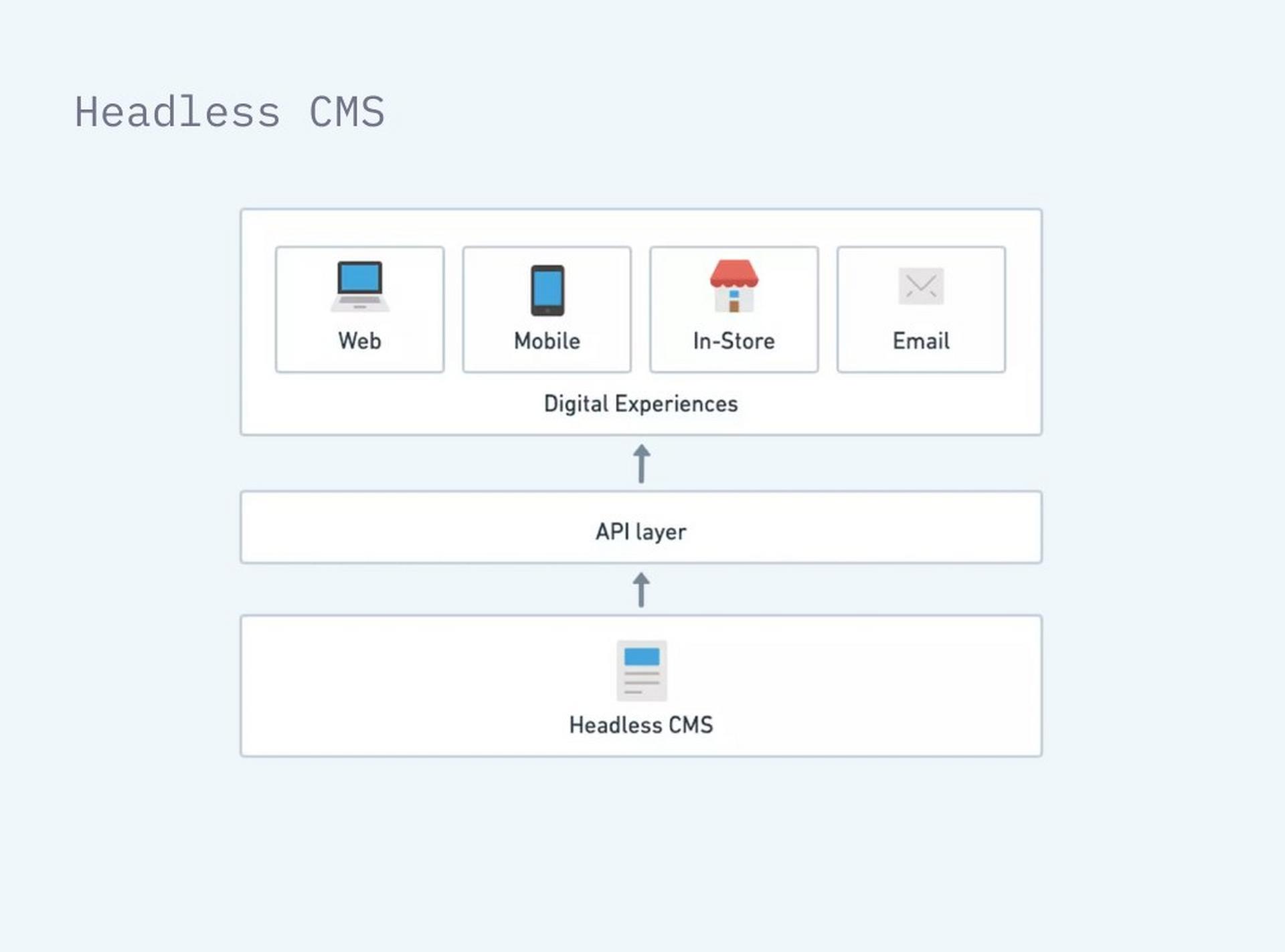
The “head“ is the frontend. Decoupling it from the “body“, the backend repository, lets one content repository serve a website, a mobile app, an in-store kiosk, digital signage and a social commerce feed at the same time.
Headless is the architecture. Composable is the strategy of selecting best-of-breed components. Headless is what makes composable commerce possible.
Agentic AI needs structured content. Monolithic systems store content as flat HTML, which agents cannot reliably read, generate against or publish into.
Generic headless platforms store content well but leave merchandising teams working in forms with no visual preview. Retail-centric headless platforms keep the decoupled architecture and add visual authoring, scheduling and retail content models.
For enterprise retail the question is no longer whether to go headless, but whether the headless platform you choose understands retail.
The era of the “all-in-one“ website builder is over. To keep pace with consumer expectations, brands are decoupling their content from their code. Let’s explore how headless CMS architecture works, why it is replacing traditional systems, and how it lays the foundation for an automated content supply chain.
What is a headless CMS?
At its simplest, a headless CMS is a content repository that is completely separated from the presentation layer.
The “body“ (the backend)
The body is the backend repository, where you create, manage, and store your content. It lives as structured data (JSON), not as designed pages.
The “head“ (the frontend)
The head is the frontend, where your content appears. It could be a website, a mobile app, a smartwatch, an in-store kiosk, or a social commerce feed.
How it works
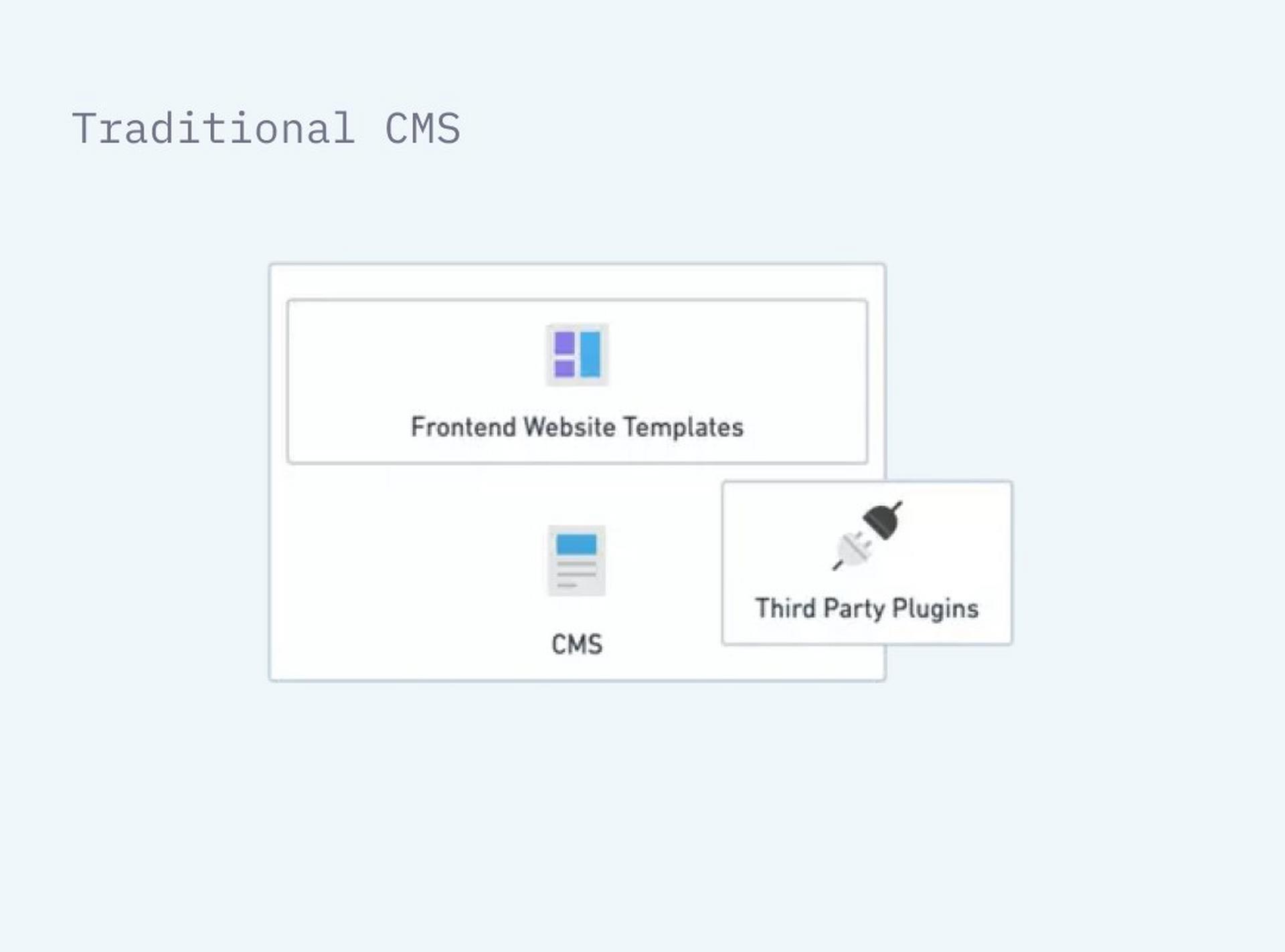
Unlike a traditional CMS (which pushes HTML to a web browser), a headless system is on-demand. It waits for an API call. When a customer opens your mobile app, the app asks the API for the latest content, and the CMS delivers it instantly. For a deeper technical breakdown of how the repository, the API and the frontend fit together, see our guide to CMS architecture.
Why the name “headless“?
It is called “headless“ because the “head“ (the frontend website) has been chopped off the “body“ (the backend repository). This sounds destructive, but it is actually liberating. It means you can have one body with ten different heads.
Headless vs. traditional CMS
To understand the future, you have to look at the limitations of the past. While monolithic systems were built for single websites, headless systems are built for the omnichannel world.
| Feature | Traditional CMS (Coupled) | Hybrid CMS | Headless CMS |
|---|---|---|---|
| Architecture | Frontend and backend are fused together. | Renders its own pages and also exposes content through APIs. | Back end only. Content is structured data, and the front end is separate code. |
| Speed to Change | Campaign changes often need a developer to edit page templates. | Fast for the website. Other channels depend on how much content is structured. | Content teams update fields that reach every channel without a code deploy. |
| Channels | Mainly one website. | Website first, with other channels through APIs. | Web, app, kiosk, in-store screen, social commerce and anything else that can call an API. |
| Who Edits | Editors, inside page templates. | Editors use the page editor for the site and forms for API content. | Editors work in a content workspace. Developers own the front ends. How much visual preview editors get varies by platform. |
| Flexibility | Low. Changing the front end risks breaking the back end. | Medium. Limited by how much content is still tied to pages. | High. Update the app without touching the data. |
| AI Readiness | Low. Content is locked in HTML. | Mixed. Depends on how much content is structured. | High. Content is structured data (JSON). |
| Best For | Simple brochure sites and blogs. | Website-led teams that need some content in other channels. | Enterprise retail and complex, multi-channel estates. |
Headless vs hybrid CMS. What is the difference?
A hybrid CMS can publish in two ways. It renders web pages itself, as a traditional CMS does, and it also delivers content through APIs to apps, screens and other channels. A headless CMS has no presentation layer of its own, so every channel gets its content by API. The difference shows when you reuse content. In a hybrid system, content written inside page templates often has to be rebuilt for another channel. In a headless system, every item is already structured data that any front end can request.
Our view, set out in February 2024 in It’s either a headless CMS or it isn’t, is that most products sold as hybrid began as page-based systems and added APIs later. Separating the two layers after years of coupled code is hard, and the page model tends to win.
The MACH Alliance offers a practical test. Its members must be microservices-based, API-first, cloud-native and headless. Amplience is a MACH Alliance-certified member.
Headless CMS vs DXP
A headless CMS stores structured content and delivers it by API. A digital experience platform (DXP) adds experience orchestration, personalization, analytics and business workflows on top of that delivery. Some DXPs are monolithic suites from one vendor. Others are composable stacks, where a headless CMS is the content layer and connects by API to search, personalization and commerce tools.
Read more in What is a headless digital experience platform (DXP)?
Why enterprise retailers are moving to headless
The primary driver is business agility, rather than just clean code.
True omnichannel delivery
Customers don’t just shop on websites. They shop on TikTok, in apps, and on marketplaces. A headless architecture allows you to centralize your content in one hub and push it to every channel via APIs. You stop managing five different CMS platforms and start managing one source of truth. The scale of that shift is not marginal: eMarketer forecasts that US social commerce sales alone will surpass $100 billion in 2026.
Speed to market
In a monolithic system, launching a new campaign often requires developer intervention to change page templates. In a headless environment, content teams can update data fields that instantly propagate across all touchpoints without a code deploy. Clarks saw this directly: simple content updates such as a promotional banner went from taking 3 to 4 days to going live in 5 to 15 minutes, with the team deploying 2 to 3 times a week instead of once a month and with zero downtime. Clarks reports a sustained 19% uplift in overall conversion.
Best-of-breed technology (MACH)
Headless CMS is a core pillar of MACH Architecture (Microservices, API-first, Cloud-native, Headless). This allows you to build a stack that fits your specific needs. You can choose the best CMS, the best commerce platform, and the best search tool, connecting them all via APIs rather than being stuck with a mediocre all-in-one suite.
How does a headless CMS support omnichannel retail?
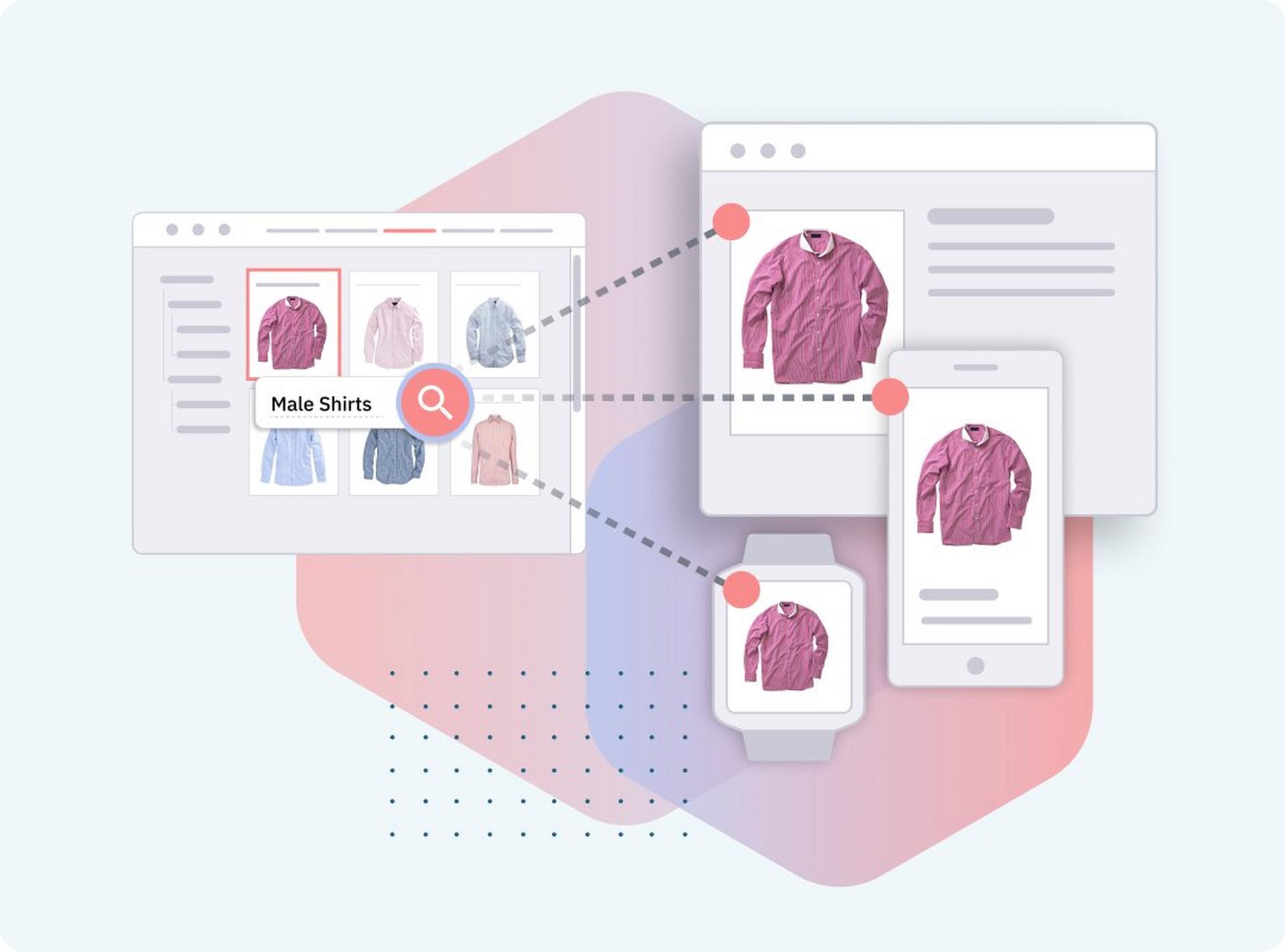
In an omnichannel setup, each piece of content is stored once as structured data and requested by every channel through an API. A campaign banner, product story or promotion isn’t tied to one page template. The website, the app and the screens in your stores each ask for the same content item and render it in their own way. When the team updates that item, every channel picks up the change on its next request.
Worked example. One weekend sale, three channels
A retailer is launching a weekend sale and wants the same message on its website, in its app and on the screens in its stores.
Create once. A merchandiser builds a single campaign banner content item, with a headline, a call to action, a link to the sale category and a hero image from the DAM.
Preview and schedule. She previews the banner on mobile, tablet and desktop, then schedules it for Friday morning.
Localize. Regional teams add locale variants inside the same content item. Each market’s API call returns its own variant.
Deliver. At go-live each channel requests the same item. The website shows it as a home page banner, the app as a native card and the store screens full-screen in landscape.
Fit the image to each screen. Dynamic Media generates the crop, size and format each device needs from the one master image, and focal point detection keeps the product in frame.
Change once. On Saturday the discount goes up. The merchandiser edits one field, and all three channels show the new offer with no code deploy.
In practice. Traeger Grills went from publishing twice a month to publishing daily across its website and mobile app.
Not all headless systems are built for retail
While the headless methodology is sound, the market is split into two categories. It is vital to understand the difference during your evaluation.
Generic headless CMS
These platforms store content well, but editing tools vary. Some offer full visual preview. Others leave marketers working mainly in forms, with limited sight of how content will look on the page.
Retail-centric headless CMS
These platforms (like Amplience CMS) retain the headless architecture but add a layer of visual control. They understand concepts like “Product,“ “Category,“ and “Season.“ They provide visual previews and scheduling tools, ensuring that while the code is decoupled, the marketer is not disconnected from the experience.
Headless CMS vs DAM. Do you need both?
A headless CMS manages structured content such as product descriptions, editorial copy and page layouts, and delivers it by API. A digital asset management (DAM) system manages rich media, including product images, video, banners and brand files. Retailers usually run both, because almost every page combines copy with media. So the choice that matters is how they connect. They can be separate products joined by an integration, or one platform with shared workflows.
| Headless CMS | DAM | |
|---|---|---|
| Manages | Structured content such as product descriptions, editorial copy and page layouts. | Rich media such as images, video, banners and brand files. |
| Core jobs | Model, write, preview, schedule and publish content. | Upload, organize, tag, govern and transform assets. |
| Delivers | Content as JSON through an API. | Assets and their variants, through the DAM’s own delivery service or a separate image CDN. |
| Main users | Marketers, merchandisers and content editors. | Creative, studio and brand teams. |
When separate systems cost more. A separate CMS, DAM and image service means three contracts and three integrations to maintain, with media transformation logic split across systems.
How Amplience handles it. Amplience CMS and Amplience DAM are part of one content operations platform, so teams manage copy and assets in the same workflows. Teams upload one master asset, and Dynamic Media generates the optimized variants each channel needs. Each product can be licensed on its own or deployed together.
See the DAM in Amplience digital asset management.
Why headless is a prerequisite for AI
Generative and Agentic AI struggle with monolithic systems. Monoliths store content as flat HTML pages, which are difficult for machines to parse and manipulate.
Headless systems store content as structured data. This is the language of AI.
Reading: Because the data is structured, AI agents can read it, understand it, and generate variations of it automatically.
Writing: Because the delivery is API-based, agents can push updates to the system programmatically.
If your strategy involves Agentic AI or automation, a headless architecture is not optional. It is the required foundation.
This is not a distant problem. Gartner forecasts that 40% of enterprise applications will be integrated with task-specific AI agents by the end of 2026, up from less than 5% in 2025. Gartner has separately predicted that traditional search engine volume will drop 25% by 2026 as search marketing loses share to AI chatbots and virtual agents. The same shift is already visible in headless commerce.
What are the drawbacks of a headless CMS?
Headless puts more work on your side of the API. There is no built-in front end, so someone has to build and run every website, app and screen that shows your content. Year-one costs usually run higher than a coupled website, because the front-end build sits on top of the platform license. Editing experience also varies between platforms. For a retailer publishing to several channels at scale, these costs pay back. For a small, single-channel estate they may not.
The AI section above still applies. If agents will read and write your content, structured content is the foundation. The trade-offs below are about cost and capability, and they apply to any headless platform.
You need front-end capacity. Developers, architects and project managers, in-house or through a systems integrator, build and maintain each front end.
Year one costs more. Implementation covers content modeling, front-end builds and integrations, on top of the license. The saving comes later, from faster changes and reuse across channels.
Suite-first organisations may prefer to stay put. Teams committed to one vendor’s full suite, and building page-based websites only, may get more from that suite.
Editing experience varies. Some headless platforms give marketers a full visual preview, while others rely mainly on forms. Test the editor with your own merchandisers before you choose.
Which headless CMS is best for enterprise retail?
Enterprise retail has different requirements from a SaaS startup or a media publisher. Choosing the wrong headless CMS creates the same bottlenecks you were trying to escape. Here is how to evaluate the market.
What enterprise retailers need from a headless CMS
Visual preview and scheduling. Content teams should not need developer support to see how a campaign will look before it goes live.
Retail-native content models. The platform should understand concepts such as Product, Category, Campaign, and Slot rather than treating everything as undifferentiated raw text.
Omnichannel delivery at scale. Web, app, kiosk, in-store screen, social commerce feed. One content repository should serve all of them without duplication.
Agentic AI readiness. Structured content stored as JSON means AI agents can read, generate, and publish variants automatically. Unstructured HTML content can’t support this.
MACH-certified and composable. The CMS should connect cleanly to your commerce platform, search layer, and personalization engine without bespoke middleware.
Enterprise-grade governance. Localization workflows, approval chains, role-based access, and audit trails all matter at scale.
Each of these is worth testing properly. Our buyer’s guide to business requirements sets out how to score a platform against them.
How Amplience’s headless CMS compares
Amplience CMS is a retail-centric headless CMS built specifically for the challenges above. Unlike generic headless platforms that store content as simple key-value data, Amplience CMS provides a visual authoring workspace, real-time preview, and scheduling tools that merchandising teams can use without raising a ticket.
Where generic platforms require custom development to add retail concepts, Amplience CMS ships with them pre-built. Where other platforms leave marketers working in forms with no visual feedback, Amplience gives teams a live canvas tied directly to the API-delivered output.
For brands already on Salesforce Commerce Cloud, commercetools, or Shopify, Amplience integrates natively. For brands planning a MACH migration, Amplience is a MACH Alliance-certified member, and its platform runs in production at enterprise retailers including Clarks, DFS and The Very Group.
How Amplience compares with other enterprise headless CMS platforms
See how Amplience compares with named platforms in the table below.
| Platform | How the vendor describes it | What Amplience includes | Full comparison |
|---|---|---|---|
| Contentful | A content platform with built-in personalization, “Built for humans. Ready for agents.“ Part of Salesforce since 1 September 2026. | A retail DAM and Dynamic Media in the same platform as the CMS. Workforce, which runs multi-step AI workflows triggered by commerce events. | Amplience vs Contentful |
| Contentstack | An “Agentic Experience Platform“ with a headless CMS, asset management, a visual editor and personalization. | Dynamic Media for real-time image and video transformation and delivery, in the same platform as the CMS and DAM. Bulk operations and multi-market scheduling in the core platform. | Amplience vs Contentstack |
| Bloomreach | “The AI Platform for Personalization“, covering ecommerce search, email and marketing automation. | A dedicated CMS and DAM that run alongside Bloomreach. DFS uses Amplience for content and assets and Bloomreach for its experience layer. | Amplience vs Bloomreach |
| Adobe Experience Manager | An “enterprise headless and composable CMS“ with visual authoring, governance and edge delivery. | A headless, API-first CMS with MACH Alliance certification, delivered as SaaS, with DAM and Dynamic Media on the same platform. | Amplience vs Adobe Experience Manager |
| Sitecore | “A leading content and digital experience platform that connects CMS, DAM and AI-search visibility.“ | A CMS, DAM, Dynamic Media and Workforce built for enterprise retail, with retail content models such as Product, Category, Campaign and Slot. | Amplience vs Sitecore |
Based on each vendor’s public website as of October 2026. Trademarks belong to their owners.
Comparing DAM and media platforms instead? See the DAM comparison hub.
Which commerce platforms does Amplience integrate with?
Amplience integrates with Salesforce Commerce Cloud, SAP Commerce Cloud, commercetools, Shopify, BigCommerce and SCAYLE. Most of these integrations let content teams pull product and category data from the commerce platform into the CMS while they build content, and the content then reaches the storefront by API. The SAP integration works differently. It displays product media from Dynamic Media in SAP Commerce Cloud storefronts. Each platform has its own page with the detail.
| Commerce platform | What the integration does | Learn more |
|---|---|---|
| Salesforce Commerce Cloud | Plan, create, preview and schedule content in Salesforce Commerce Cloud using Amplience CMS. Works with SiteGenesis, SFRA and Composable Storefront. A Dynamic Media cartridge serves images, and a Marketing Cloud integration reuses content in email. More than 80 brands on Salesforce Commerce Cloud use Amplience. | Amplience for Salesforce |
| SAP Commerce Cloud | A Premium Certified Integration displays product media from Dynamic Media in SAP Commerce Cloud (Hybris) storefronts. | Amplience for SAP |
| commercetools | Reuse category, product and user segment details from commercetools when creating content. | Amplience for commercetools |
| Shopify | Reuse category, product and user segment details from Shopify when creating content. | Amplience for Shopify |
| BigCommerce | Reuse category, product and user segment details from BigCommerce when creating content. | Amplience for BigCommerce |
| SCAYLE | Reuse category and product details from SCAYLE. Amplience comes pre-integrated with the SCAYLE storefront. | Amplience for SCAYLE |
For commercetools, Shopify, BigCommerce and SAP, the eComm Toolkit extension brings core commerce information into Amplience, so editors stop switching between platforms. See every integration, extension and front end in the Amplience Marketplace.
Key questions to ask any headless CMS vendor
- Can non-technical users preview and schedule content without developer support?
- Does the platform have pre-built integrations with your commerce platform?
- How does the content model handle product, category, and campaign relationships?
- Is the platform MACH-certified?
- How does the platform support agentic AI workflows, not just generative AI content creation?
- What are the SLAs for availability and content delivery performance at peak traffic?
What does a headless CMS cost?
A headless CMS has two cost lines, the platform license and the implementation. Vendor-supported platforms charge a subscription, usually on an annual or multi-year contract. The price is typically set by usage, such as traffic, content volume or API calls, and often by users, locales or environments too. Open-source options have no license fee for the core product, but you pay for hosting, support and maintenance. Implementation covers content modeling, front-end builds and integrations.
Common pricing models
| Model | How it works | Watch for |
|---|---|---|
| Vendor-supported subscription | The vendor runs hosting, scaling and maintenance for a license fee. Enterprises usually sign multi-year contracts. | What sits inside the quoted tier, and what is licensed separately. |
| Open source | Free to start. You host, support and integrate it yourself. Some projects sell a paid enterprise edition. | Support, maintenance and integration costs at enterprise scale. |
| Free trial or free tier | Try the platform or build a proof of concept. | Usage and feature limits. Free tiers mostly suit developers and hobby projects. |
| Monthly subscription | Pay month to month. More common with smaller providers. | Whether support and scale match enterprise needs. |
What drives the total cost
Usage basis. Traffic, content volume, API calls, media delivery, seats or locales, depending on the vendor.
Scope. How many brands, sites, markets and teams the platform serves.
Add-on products. Whether DAM, image delivery, personalization or AI automation are included or licensed separately.
Implementation approach. Your own team, a systems integrator or a blend of both. Integrators commonly charge on time and resources or a fixed price.
Running costs. Front-end hosting, ongoing development and support after go-live.
How Amplience prices. Every engagement is tailored, and we don’t publish list prices. Fees are based on visits across your digital properties, with unlimited API calls and a 99.99% SLA on every success plan. Pricing reflects organisational scope, content volume and throughput, media storage and delivery, and automation depth. The CMS, DAM, Dynamic Media and Workforce can each be licensed alone or together.
See Amplience pricing, or read the buyer’s guide chapter on pricing and commercial models.
Future-proof your tech stack
Additional resources
Monolith to MACH: Scaling Content Management with AWS and Amplience
Migrating from a monolith to MACH? Discover how Amplience’s headless CMS, running on AWS, provides a scalable solution for composable commerce.
Headless CMS FAQ
Ready for whatever commerce throws at you next?
See how we help teams move from idea to everywhere.